
Skills & Competency Management Software
A single source of truth for workforce capability — combining skills, competency, and qualifications with structured assessment and evidence.
The Challenge of Managing Skills and Competency
Many organisations still manage workforce skills and competency across spreadsheets, training records, static skills matrices, and disconnected systems.
This makes it difficult to:
- see who is qualified for which roles or tasks
- assess skills and competency consistently
- validate readiness with evidence
- identify verified gaps early
- connect capability data to development, performance, and career decisions
As a result, organisations struggle to confidently answer a simple question:
Who is ready to perform this role, and how do we know?

When Organisations Review Their Skills and Competency Approach
Organisations typically start looking for skills and competency management software when:
- Spreadsheet-based skills matrices are difficult to maintain or no longer trusted.
- Training records show completion, but not whether competence has been demonstrated.
- Managers assess skills and competency inconsistently across teams or locations.
- Qualification, certification, and evidence records are spread across multiple systems.
- Workforce gaps are being identified too late.
- Development and performance decisions are not clearly linked to role requirements.
- Compliance, audit, or operational assurance requirements need stronger evidence.
- Leaders need a more reliable way to understand workforce capability and readiness.
These situations often reveal a common problem: skills and training information exists, but verified workforce readiness visibility does not.
A structured skills and competency management system helps organisations connect role requirements, skills, qualifications, competency assessments, evidence, development activity, and reporting in a single source of truth.
What you can achieve
- Clear visibility of workforce skills and competency across roles and teams
- Consistent, evidence-based assessment
- Faster identification of skills and competency gaps
- Better alignment of development, performance, and career processes
- Reduced compliance and operational risk
- Less administrative effort through a single structured system
For Employees

- Clear understanding of role requirements and expectations
- Visibility of current skills, competency levels, and development needs
- Ownership of development through structured plans and tracked progress
- Recognition of achievements, certifications, and demonstrated capability
- Clear pathways for career progression and role movement
For Managers

- A single consistent view of team capability and readiness
- Structured, objective assessment of skills and competency
- Clear identification of gaps and development priorities
- Better visibility to support deployment, performance, and development discussions
- Reduced reliance on informal or subjective judgement
For HR & Leadership

- A single, reliable view of workforce capability across the organisation
- Consistent frameworks and assessment standards across teams and locations
- Improved compliance, audit readiness, and risk management
- Better alignment between workforce capability and organisational priorities
- Clearer insight to support strategic workforce, development, and succession decisions
Skills Matrix or Skill Inventory vs Structured Competency Management
Many organisations begin with a skills matrix or skill inventory to record experience. These tools provide basic visibility.
However, when workforce decisions affect hiring, mobility, compliance, or evaluation, a simple list of declared skills is not enough.
Structured competency management adds defined standards, assessment evidence, and consistent application across roles and teams.
A skill inventory records what someone says they can do.
Structured competency management verifies what they can demonstrate on the job.

Where Organisations Typically Start
Most organisations do not begin with a fully defined competency framework. Common starting points include:

Starting from scratch
- Build structured frameworks
- Define measurable standards
- Establish scalable foundations

Digitizing Existing Frameworks
- Import documented slills and competencies
- Apply consistent rating models
- Introduce structured assessment

Moving Beyond Skills Inventory
- Validate on job proficiency
- Compare required vs achieved levels
- Identify verified capability gaps

Focused Deployment
- Support compliance or onboarding
- Enable leadership development
- Align career and succession planning
Organisations adopt skills and competency management from different starting points, depending on their level of maturity and existing processes. Most begin from one of the following positions:
Organisations adopt skills and competency management from different levels of maturity. Centranum supports each of these starting points without requiring rework or data loss.
How Skills & Competency Management Works
1. Define Role Requirements
Create role profiles that define required:
- skills and competencies
- capability requirements (e.g. certifications, experience)
- expected proficiency levels
These profiles establish clear, measurable standards for each role.
2. Maintain Structured Skills & Competency Frameworks
with:
- observable indicators
- consistent rating models
- reusable structures across roles and job families
Frameworks are version-controlled and designed to scale as requirements evolve.
3. Assess and Record
Capture:
- demonstrated skills and competency on the job
- capability achievements (e.g. certifications, training)
- assessment results using structured indicators and scoring logic
All results are recorded with supporting evidence and audit history.
4. Compare and Act
Compare required and achieved levels to:
- identify verified capability gaps
- support development planning
- track certification and compliance status
- enable workforce reporting and decision-making
Platform capabilities
Centranum brings framework definition, assessment, reporting, and development into one structured system. The capabilities below work together to support consistent standards and verified workforce insight.

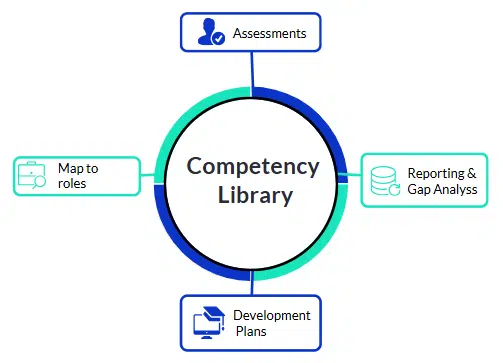
Competency Library
Central, governed repository of structured competencies and proficiency levels.

Competency Mapping
Link competencies to roles, teams, frameworks, or standalone models.

Competency Assessment
Structured evaluation using indicators, evidence, and multi-rater workflows.

Reporting & Skills Gap Analysis
Real-time visibility into competency levels, trends, and workforce gaps.

Learning Alignment
Connect identified skills and competency gaps to targeted development and training resources.
Competency Library
The Problem It Solves
Competency frameworks often live in policy documents, spreadsheets, or disconnected systems. Updates are difficult to manage, version control is unclear, and assessment standards drift over time.
How Centranum Addresses It
Centranum provides a governed central library where competencies can be:
- Defined with structured, measurable indicators
- Maintained with version control and change tracking
- Organized by types (technical, leadership, core, regulatory) and configurable categories
- Configured with appropriate rating models
- Managed with controlled editing permissions
Organisations can import their own frameworks or use available multi-industry reference libraries as starting points and adapt them to suit their context.
The result is a living framework that evolves without losing consistency or historical records.

Competency Types and Framework Structures
A structured competency framework can include multiple competency types within the same system, reflecting different organisational needs:
- Role-specific technical or functional competencies
- Core organisational competencies
- Values-based behaviours used in performance reviews
- Leadership competency models
- Professional, clinical or regulatory standards
Competencies can be applied at different levels, including:
- individual roles
- job families
- functions or business units
- organisation-wide frameworks
This enables organisations to manage diverse competency models within a single, consistent structure. — supporting both operational requirements and broader talent management processes. Frameworks can be configured to reflect organisational structure, regulatory requirements, and varying levels of complexity.
Competency Mapping
The Problem It Solves
Role requirements are often unclear, duplicated across departments, or disconnected from career progression. When roles evolve, updates are difficult to manage without breaking reporting consistency.
How Centranum Addresses It
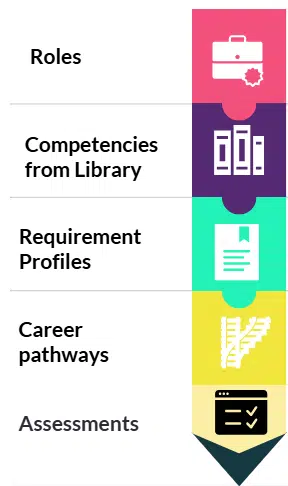
Competencies can be mapped to:
- Individual roles
- Job families
- Leadership or cross-role frameworks
- Career pathway levels – management or specialized tracks
Role-level capability profiles define required competency levels where applicable, enabling structured comparison between required and achieved standards.
Version-controlled mapping ensures updates to roles or frameworks do not disrupt historical records or reporting.
Profile assignment can be automated when new hires join or when individuals change roles, maintaining consistency without manual rebuilding.
Competency Assessment & Evidence
The Problem It Solves
Assessment often relies on inconsistent interpretation of standards, manual tracking, and fragmented sign-off processes. Scaling systematic assessment across teams can create significant administrative burden.
How Centranum Addresses It
Competency assessments operate from structured competency profiles or can be conducted independently on any competency for ad hoc evaluation.
The system supports:
- Multiple assessment methods (e.g., observation, validation forms, evidence upload, knowledge verification tests where applicable)
- Configurable rating models (binary or graded scales)
- Indicator-level scoring that determines overall competency outcomes
- Assessment templates for rapid setup
- Multiple assessor types (self, manager, mentor, expert, peer, etc.)
- Structured approval and sign-off workflows
- Manager dashboards to conduct and monitor multiple assessments efficiently
This enables consistent, scalable assessment without relying on manual collation or subjective interpretation.

Consistent Assessment Through Structured Scoring
As part of the assessment process, consistency is achieved through structured scoring models.
Indicator ratings determine the overall competency outcome according to defined scoring rules and thresholds.
The system supports configurable rating scales, optional required levels, and automated outcome calculation to improve consistency while maintaining transparency.
Capture Capability and Competency Evidence
Assessment results are supported by captured evidence, ensuring validation and auditability.
Capability records (qualifications, certifications, training, experience) are maintained alongside assessed competency outcomes.
Required and achieved levels can be compared across individuals, roles, and teams, supporting gap visibility, passport views, and compliance reporting within a single system.
Competency Reporting & Analytics, Skills Matrix & Gap Analysis
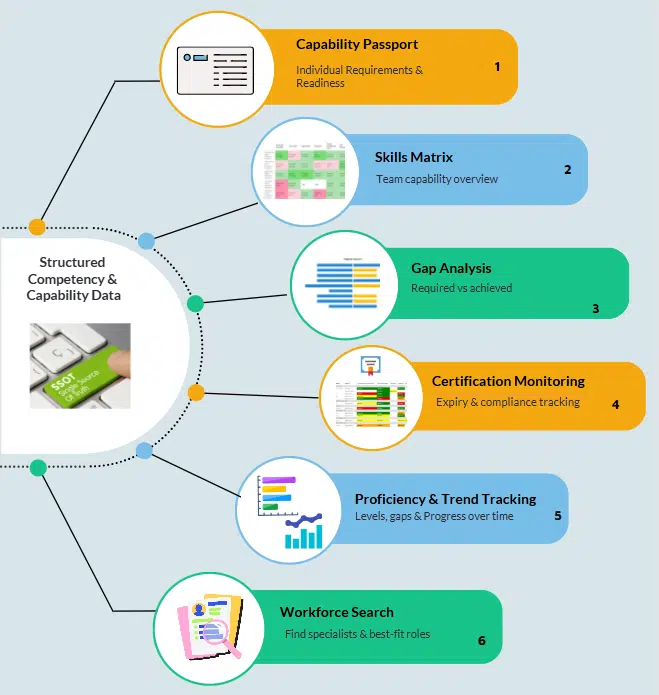
Reporting is driven by governed competency frameworks and mapped role requirements. Because capability and competency data operate within the same structure, reporting distinguishes inferred competence from demonstrated proficiency — at individual, team, and organisational levels.
The Problem It Solves
Leaders often lack clear visibility into where real capability gaps exist. Skills matrices become outdated, and compliance risk remains hidden until audits occur.
How Centranum Addresses It
Reporting is directly tied to governed competency frameworks and mapped role requirements — ensuring a single source of truth, consistency and accuracy across the organisation.
Because capability records and assessed competency outcomes operate within the same structure, reports distinguish between:
- Capability factors that infer competence
- Demonstrated proficiency validated through competency assessment
Centranum provides real-time reporting across individuals, roles, teams, and organisational levels.
Individual-Level Insight
Individual dashboards provide:
- Capability passport views showing all current requirements and gaps
- Historical assessment records
- Certification and compliance status
Manager-Level Visibility
Manager dashboards enable:
- Monitoring of team assessment progress and outcomes
- Visibility of historical results
- Ability to view and complete multiple assessments efficiently
Team and Organisational Reporting
Reporting supports:
- Required versus achieved capability and competency comparison
- Certification expiry heatmaps
- Assessed proficiency levels by competency
- Identified competency gaps for development
- Skills matrix views for operational planning
- Trend analysis across time periods
- Cross-team or cross-location comparison
- Capability search to identify individuals with specific competencies or best-fit alignment for a role
Reports can drill down to indicator or behavioral standard level, enabling targeted development and evidence-based workforce planning.
What This Enables
This reporting structure allows leaders to:
- Monitor workforce readiness and risk
- Identify specialist capability clusters
- Prioritise development investment
- Support audit and quality assurance programmes
Learning Alignment and Development
The Problem It Solves
Training is often assigned generically, without clear linkage to verified competency gaps. Development plans become administrative exercises rather than targeted interventions.
How Centranum Addresses It
Centranum links competencies within the framework directly to learning resources and development actions, ensuring development activity is grounded in verified gaps rather than assumption.
Verified gaps can be connected to structured development objectives and career progression requirements, supporting targeted, role-specific growth.

Learning and Development Integration
The system supports:
- Linking competencies to internal or external learning resources
- Informal learning catalogues
- Integration with existing LMS platforms where required
- Optional training management functionality
- Gap-Driven Development Planning
Centranum enables:
- Automatic creation of competency-linked development objectives based on identified gaps
- Automatic assignment of onboarding development when new hires join or roles change
- Tracking development progress against required competency levels
- Monitoring learning effectiveness over time
- Oversight and Reporting
Leaders and managers can:
- Identify individuals or teams without development plans
- Monitor progress against development objectives
- Track completion and impact across departments or roles
- Align development plans with career pathways and succession readiness frameworks.
Development investment becomes targeted, measurable, and aligned to verified workforce needs.

Connecting Competency to Performance and Career Decisions
Once gaps and readiness are identified, competency data can be used to support wider talent processes.
Where required, competencies can be used within the performance management process to evaluate values-based behaviours and core competencies alongside broader performance outcomes.
Competency assessment and capability readiness data can also support:
- Career development planning
- Internal mobility decisions
- Succession discussions
- Leadership development with 360 feedback
Competency assessment confirms whether defined standards have been achieved.
Performance management considers overall results and contribution.
Together, they provide clearer insight for development and workforce decisions.
Automation & Admin Efficiency
Across all stages, automation reduces administrative effort and ensures consistency at scale.
Manual competency tracking often involves:
- Maintaining multiple spreadsheets
- Re-entering data across systems
- Manually monitoring certification expiry
- Rebuilding role competency assignments when staff move
Centranum reduces administrative burden through structured automation built into the system architecture.

Automated Structure and Assignment
- Competency and capability profiles are automatically assigned to new hires based on role
- Role changes trigger updated competency requirements without rebuilding frameworks
- Development plans can be generated automatically from verified gaps
- Certification and compliance requirements update dynamically as capability records change

Built-In Workflow and Reporting
- Assessment workflows operate from structured competency profiles
- Indicator scoring logic calculates overall competency outcomes automatically
- Real-time reporting removes the need for manual collation
- Expiry tracking and alerts reduce compliance risk

Generative AI Assistance (Optional)
AI tools can assist with:
- Drafting initial competency profiles
- Suggesting structured indicators
- Aligning role descriptions to competency standards
- Recommending learning resources where catalogue data is available
All AI-generated content remains reviewable and under organisational control.
What is Skills and Competency Management Software?
Skills management software centralises organisational skills data into a structured, searchable system.
It enables organisations to:
- Maintain a live skills matrix
- Track individual skills and proficiency levels
- Monitor certifications and expiry dates
- Identify skills gaps across teams and roles
- Report on workforce readiness in real time
Unlike static spreadsheets, a skills management system keeps skills data accurate, auditable, and immediately usable for staffing, planning, and compliance decisions.

Competency management is the structured definition and validation of demonstrated proficiency in role-relevant knowledge and skills.
It evaluates what individuals can reliably achieve on the job — not just training completion, certifications, or self-reported experience.
Why organisations use both together
Most organisations start with skills tracking — a skills matrix or inventory that shows what people can do.
But skills alone do not answer:
- how well someone can perform in a role
- whether capability has been validated
- what level of proficiency is required
- what evidence supports readiness
Competency management builds on skills by adding:
- structured frameworks
- defined proficiency levels
- consistent assessment methods
- evidence and validation
Together, skills and competency management provide a complete, reliable view of workforce capability — supporting better decisions around development, deployment, and performance.
Competency and Capability: A Complete View
Skills represent the specific tasks or techniques an individual can apply.
Competency refers to demonstrated knowledge and proficiency against defined standards in a specific role or context.
Capability includes enabling factors such as qualifications, certifications, training, and experience that support the development of proficiency.
In simple terms:
- Skills reflect what someone can do
- Competency reflects how effectively it is demonstrated
- Capability reflects the preparation and background that supports performance
Centranum enables organisations to manage all three within a single structured system — linking skills, certifications, training records, and experience with validated competency outcomes.
Related Reading
Explore deeper insights into competency management implementation, evaluation, and return on investment:
What is Competency Management?
Skills vs Competency vs Capability – the difference ?
How to Build a Competency Framework
Workforce Capability & Competency Management – the Centranum framework
Competency Management Software Comparison (2026 Guide)
FAQ
What is the difference between skills, competency and capability?
Competency refers to demonstrated performance — applying knowledge and skills effectively in context and assessed against defined standards.
Skills represent the tasks or activities performed as part of that competency.
Capability includes qualifications, certifications, training, and experience. These indicate potential, but do not confirm competence on the job.
Effective workforce management requires visibility into all three — ensuring individuals not only have capability and knowledge, but can demonstrate competency through appropriate on-the-job performance.
What’s the difference between a skills matrix, a skills inventory, and competency management?
A skills matrix or skills inventory records who has experience in specific areas. Structured competency management goes further by defining proficiency levels, observable indicators, and validated assessments with documented evidence. This ensures workforce decisions are based on verified competence rather than self-reported skills. In practice, many organisations begin with a skills matrix or inventory and then evolve toward structured competency management as requirements for consistency, validation, and scalability increase.
Can we define role-based skills and competency requirements?
Yes. The platform allows organisations to define role-based requirements that include:
- required skills and competencies
- expected proficiency levels
- qualifications, certifications, and experience
These requirements can be applied to individual roles, job families, or organisational structures, enabling consistent expectations and assessment across teams.
How are skills and competencies assessed?
Skills and Competencies can be assessed through workplace observation, structured rating scales, multi-rater validation, and evidence documentation. Knowledge can also be evaluated through linked assessments where appropriate. All results are recorded against defined indicators and proficiency levels.
Can the system track certifications, qualifications, and evidence?
Yes. In addition to skills and competency assessment, the system tracks:
- certifications and qualifications, work authorizations
- training and learning records
- experience and capability history
- supporting evidence such as observations or documents
All records are version-controlled and include assessed competency levels, providing a complete and audit-ready view of workforce capability.
How does the platform support development and career progression?
The platform links competency and skills assessment results directly to development planning.
This allows organisations to:
- identify verified capability gaps
- assign targeted development actions
- align learning resources to specific needs
- track progress over time
These insights can also support career pathways, role progression, and succession planning by showing readiness against future role requirements.
Can we use our own competency or skills framework?
Yes. You can import existing frameworks, adapt validated libraries, or build role-specific skills and competency profiles. Governance controls ensure version management and structured updates over time.
Can we track changes in skills and competency over time?
Yes. Historical assessments are retained, enabling trend analysis, progress tracking, and comparison across roles, teams, or time periods. This supports compliance reporting and long-term workforce planning.
Does the system integrate with our LMS or HR systems?
Yes. Integration options support synchronization of user data, training completions, and learning resources via API or structured data exchange, depending on organisational requirements.
Is the system suitable for regulated or compliance-driven environments?
Yes. Structured competency frameworks, documented assessments, version control, and audit trails support regulatory compliance, quality assurance, and defensible workforce decisions.
What is the ROI of skills and competency management software?
Return on investment typically comes from reduced training waste, improved productivity, reduced compliance risk, clearer development pathways, and improved internal mobility and succession readiness.